Adding the Copyright info:
The bottom of the first (first only!) page of your paper has to include “copyright notice“ according to the following instructions (see the figure below):
- For papers in which all authors are employed by the US government, the copyright notice is:
U.S. Government work not protected by U.S. copyright
- For papers in which all authors are employed by a Crown government (UK, Canada, and Australia), the copyright notice is:
979-8-3195-1875-0/26/$31.00 ©2026 Crown
- For papers in which all authors are employed by the European Union, the copyright notice is:
979-8-3195-1875-0/26/$31.00 ©2026 European Union
- For all other papers the copyright notice is:
979-8-3195-1875-0/26/$31.00 ©2026 IEEE
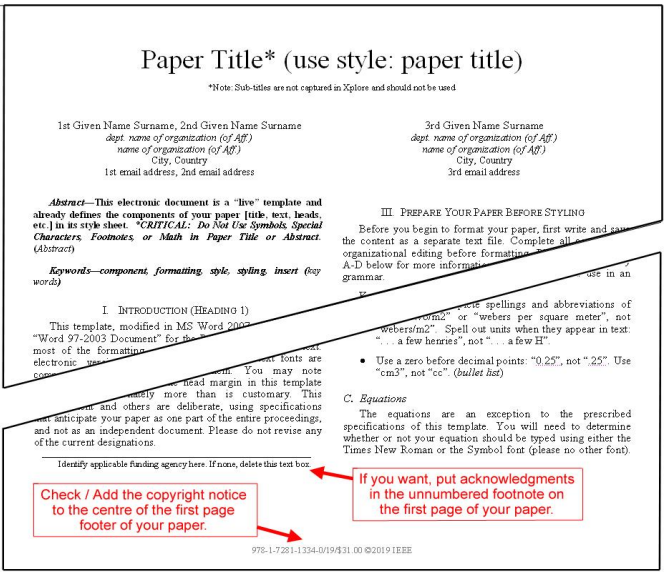
Once the copyright info has been added, you can check if your paper from your source application format to Xplore-compatible
PDF using IEEE PDF eXpress;
Before Creating a PDF
Proofread your source document thoroughly to confirm that it will require no revision.
Creating your PDF eXpress Account
Log in to the IEEE PDF eXpress® site
First-time users should do the following:
- Create Account
- Enter the following:
- 70204X for the Conference ID
- your email address
- a password
Continue to enter information as prompted.
An Online confirmation will be displayed and an email confirmation will be sent
verifying your account setup.
Previous users of PDF eXpress need to follow the above steps but should enter the same
password that was used for previous conferences. Verify that your contact information is valid.
Contacting PDF eXpress Support
Access the IEEE Support Center for IEEE PDF eXpress.
If you do not find an answer to your question on the IEEE Support Center, please email
PDFSupport@ieee.org